Spring AI is Coming
Spring AI 项目旨在简化包含Artificial Intelligence功能的应用程序的Development,避免不必要的复杂性。
该项目从著名的 Python 项目(例如 LangChain 和 LlamaIndex)中汲取灵感,但 Spring AI 并不是这些项目的直接移植。 该项目的成立相信下一波生成式Artificial Intelligence应用程序不仅适用于 Python Development人员,而且将在许多编程语言中普遍存在。
Spring AI 的核心提供了抽象,作为Development AI 应用程序的Basic。 这些抽象有多种Implementation,可以通过最少的Code更改轻松进行组件交换。
一、Spring AI 提供以下功能
-
Support for all major Model providers such as OpenAI, Microsoft, Amazon, Google, and Huggingface.
(支持所有主要模型提供商,例如 OpenAI、Microsoft、Amazon、Google 和 Huggingface)
-
Supported Model types are Chat and Text to Image with more on the way.
(支持的模型Type包括”聊天”和”文本到图像”,还有更多模型Type正在Development中)
-
Portable API across AI providers for Chat and for Embedding models. Both synchronous and stream API options are supported. Dropping down to access model specific features is also supported.
(跨 AI 提供商的可移植 API,用于聊天和嵌入模型。 支持Synchronization和流 API 选项。 还支持下拉访问模型特定功能)
-
Mapping of AI Model output to POJOs.
(AI 模型输出到 POJO 的映射)
-
Support for all major Vector Database providers such as Azure Vector Search, Chroma, Milvus, Neo4j, PostgreSQL/PGVector, PineCone, Qdrant, Redis, and Weaviate
(支持所有主要矢量Database提供商,例如 Azure 矢量搜索、Chroma、Milvus、Neo4j、PostgreSQL/PGVector、PineCone、Qdrant、Redis 和 Weaviate)
-
Portable API across Vector Store providers, including a novel SQL-like metadata filter API that is also portable.
(跨 Vector Store 提供商的可移植 API,包括同样可移植的新颖的类似 SQL 的元Data过滤器 API)
-
Function calling
(Function调用)
-
Spring Boot Auto Configuration and Starters for AI Models and Vector Stores.
(AI 模型和向量Storage的 Spring Boot 自动Configuration和Start器)
-
ETL framework for Data Engineering
(Data工程的 ETL Framework)
二、俗语介绍
Models
Models模型是旨在处理和生成信息的算法,通常模仿人类的认知功能。 通过从大型数据集中学习模式和见解,这些模型可以做出预测、文本、图像或其他输出,从而增强跨行业的各种应用程序。
有许多不同Type的Artificial Intelligence模型,每种模型都适合特定的用例。 虽然 ChatGPT 及其生成式Artificial Intelligence功能通过文本输入和输出吸引了用户,但许多模型和公司提供了多样化的输入和输出。 在 ChatGPT 之前,很多人对 Midjourney 和 Stable Diffusion 等文本到图像生成模型着迷。
下表根据输入和输出Type对几种模型进行了分类:
| Input | Output | Examples |
|---|---|---|
| Language/Code/Images (Multi-Modal) | Language/Code | GPT4 - OpenAI, Google Gemini |
| Language/Code | Language/Code | GPT 3.5 - OpenAI-Azure OpenAI, Google Bard, Meta Llama |
| Language | Image | Dall-E - OpenAI + Azure, Deep AI |
| Language/Image | Image | Midjourney, Stable Diffusion, RunwayML |
| Text | Numbers | Many (AKA embeddings) |
Prompts
Prompts是基于语言的输入的基础,指导人工智能模型产生特定的输出。 对于熟悉 ChatGPT 的人来说,提示可能看起来只是发送到 API 的对话框中输入的文本。 然而,它包含的内容远不止于此。 在许多 AI 模型中,提示文本不仅仅是一个简单的字符串。
ChatGPT 的 API 在Prompts中具有多个文本输入,每个文本输入都被分配一个角色。 例如,系统角色告诉模型如何行为并Settings交互的上下文。 还有用户角色,通常是来自用户的输入。
简单来说就是UsageLLM等模型时,Prompts是输入,Prompts中输入内容被分配成不同的角色,每个角色控制不同的功能。Prompts的制定就成为重要的输入,可以共享,多人制定。
Prompt Templates
Create有效的提示涉及建立请求的上下文并用特定于用户输入的值替换部分请求。此过程Usage传统的基于文本的模板引擎进行提示Create和管理。 Spring AI 为此Usage OSS Library StringTemplate。
Prompt Templates输入Prompts的模板,在Spring AI中,Prompt Templates可以比作Spring MVC架构中的”Views”。 提供模型对象(通常是 java.util.Map)来填充模板内的占位符。 “‘rendered‘“字符串成为提供给 AI 模型的提示内容。
Embeddings
Embeddings将文本转换为数值数组或向量,使Artificial Intelligence模型能够处理和解释语言Data。 这种从文本到数字的转换是Artificial Intelligence如何与人类语言交互并理解人类语言的关键要素。 作为探索Artificial Intelligence的 Java Development人员,没有必要理解复杂的数学理论或这些向量表示背后的具体Implementation。 对它们在Artificial Intelligence系统中的角色和功能有基本的Understand就足够了,特别是当您将Artificial Intelligence功能集成到应用程序中时。
嵌入在实际应用中尤其重要,例如检索增强生成(RAG)Pattern。 它们能够将Data表示为语义空间中的点,该语义空间类似于欧几里得几何的二维空间,但维度更高。 这意味着就像欧几里得几何中平面上的点根据其坐标可以接近或远离一样,在语义空间中,点的接近反映了含义的相似性。 关于相似主题的句子在这个多维空间中位置更近,就像图表上彼此靠近的点一样。 这种接近性有助于文本分类、语义搜索甚至产品推荐等任务,因为它允许Artificial Intelligence根据相关概念在扩展语义环境中的”位置”来辨别和分组。
您可以将这个语义空间视为一个向量。
Output Parsing
AI 模型的输出传统上以 java.lang.String 形式到达,即使您要求回复采用 JSON 格式。 它可能是正确的 JSON,但它不是 JSON Data结构。 它只是一个字符串。 此外,在提示中询问”for JSON”并不是 100% 准确。
这种复杂性导致了一个专门领域的出现,涉及Create提示以产生预期的输出,然后将生成的简单字符串Analysis为可用的Data结构以进行应用程序集成。
输出Analysis采用精心Design的提示,通常需要与模型进行多次交互才能Implementation所需的格式。
这一挑战促使 OpenAI 引入”OpenAI Function”作为精确指定模型所需输出格式的Method。
三、Bringing Your Data to the AI model
(将您的数据引入人工智能模型)
存在三种技术可用于自定义 AI 模型以合并您的Data:
微调:这种传统的Machine Learning技术涉及定制模型并更改其内部权重。 然而,对于Machine Learning专家来说,这是一个具有挑战性的过程,而且对于 GPT 等模型来说,由于其规模,资源极其密集。 此外,某些型号可能不提供此选项。
提示填充:更实用的替代方案是将Data嵌入到提供给模型的提示中。 考虑到模型的令牌限制,需要技术来在模型的上下文窗口中呈现相关Data。 这种Method通俗地称为”填充提示”。 Spring AI Library可帮助您Implementation基于”填充提示”技术(也称为检索增强生成 (RAG))的Solution。
Function调用:此技术允许注册自定义用户Function,将大型语言模型连接到外部系统的 API。 Spring AI 极大地简化了支持Function调用所需编写的Code。
四、其它说明
Retrieval Augmented Generation
一种名为检索增强生成 (RAG) 的技术已经出现,旨在解决将相关Data纳入提示中以Implementation准确的 AI 模型响应的挑战。
该Method涉及Batch Processing风格的编程模型,其中作业从文档中读取非结构化Data,对其进行转换,然后将其写入矢量Database。 从较高层面来看,这是一个 ETL(提取、转换和加载)Pipeline。 RAG技术的检索部分Usage向量Database。
作为将非结构化Data加载到矢量Database的一部分,最重要的转换之一是将原始文档分割成更小的部分。 将原始文档分割成更小的部分的过程有两个重要步骤:
将文档拆分为多个部分,同时保留内容的语义边界。 例如,对于包含段落和表格的文档,应避免在段落或表格的中间拆分文档。 对于Code,避免在MethodImplementation的中间拆分Code。
将文档的各个部分进一步拆分为大小仅为 AI 模型令牌限制的一小部分的部分。
RAG 的下一阶段是处理用户输入。 当Artificial Intelligence模型要回答用户的Problem时,该Problem和所有”相似”文档片段都会被放入发送给Artificial Intelligence模型的提示中。 这就是Usage矢量Database的原因。 它非常擅长查找相似内容。
Implementation RAG 时Usage了几个概念。 这些概念映射到 Spring AI 中的类:
DocumentReader:一个 Java 函数接口,负责从数据源加载 List
Document:数据源的基于文本的表示形式,还包含用于描述内容的元数据。
DocumentTransformer:负责以各种方式处理数据(例如,将文档分割成更小的部分或向文档添加额外的元数据)。
DocumentWriter:允许您将文档保存到数据库中(最常见的是在 AI 堆栈中,矢量数据库)。
Embedding:将数据表示为 List
Function Calling
大型语言模型(LLM)在训练后被冻结,导致知识过时,并且无法访问或修改外部Data。Function调用Mechanism解决了这些缺点。 它允许您注册自定义用户Function,将大型语言模型连接到外部系统的 API。 这些系统可以为法学硕士提供Real-time Data并代表他们ExecuteData处理操作。
Spring AI 极大地简化了支持Function调用所需编写的Code。 它为您ProxyFunction调用对话。 您可以将Function作为 @Bean 提供,然后在提示选项中提供该Function的 bean 名称以激活该Function。 您还可以在单个提示中定义和引用多个Function。
Evaluating AI responses
有效评估Artificial Intelligence系统响应用户请求的输出对于确保最终应用的准确性和有用性非常重要。 一些新兴技术可以Usage预训练模型本身来Implementation此目的。
此评估过程涉及分析生成的响应是否符合用户的意图和查询的上下文。 Relevance、连贯性和事实正确性等Metrics用于衡量Artificial Intelligence生成的响应的质量。
一种Method涉及呈现用户的请求和Artificial Intelligence模型对模型的响应,查询响应是否与提供的Data一致。
此外,利用矢量Database中Storage的信息作为补充Data可以增强评估过程,有助于确定响应Relevance。
Spring AI 项目当前提供了一些非常基本的Example,说明如何以提示的形式评估响应以包含在 JUnit Test中。
五、功能说明
Embeddings Models
Chat Models
- Chat Completion API
- OpenAI Chat Completion (streaming and function-calling support)
- Microsoft Azure Open AI Chat Completion (streaming and function-calling support)
- Ollama Chat Completion
- HuggingFace Chat Completion (no streaming support)
- Google Vertex AI PaLM2 Chat Completion (no streaming support)
- Google Vertex AI Gemini Chat Completion (streaming, multi-modality & function-calling support)
- Amazon Bedrock
- MistralAI Chat Completion (streaming and function-calling support)
Image Generation Models
Vector Databases
六、SpringBoot AI 接入 Ollama Chat
这里以Chat Models为例,Create一个springboot ai项目。
说明:由于Openai api key收费,这里以Ollama Chat为LLM演示。
本地搭建Ollama Chat
-
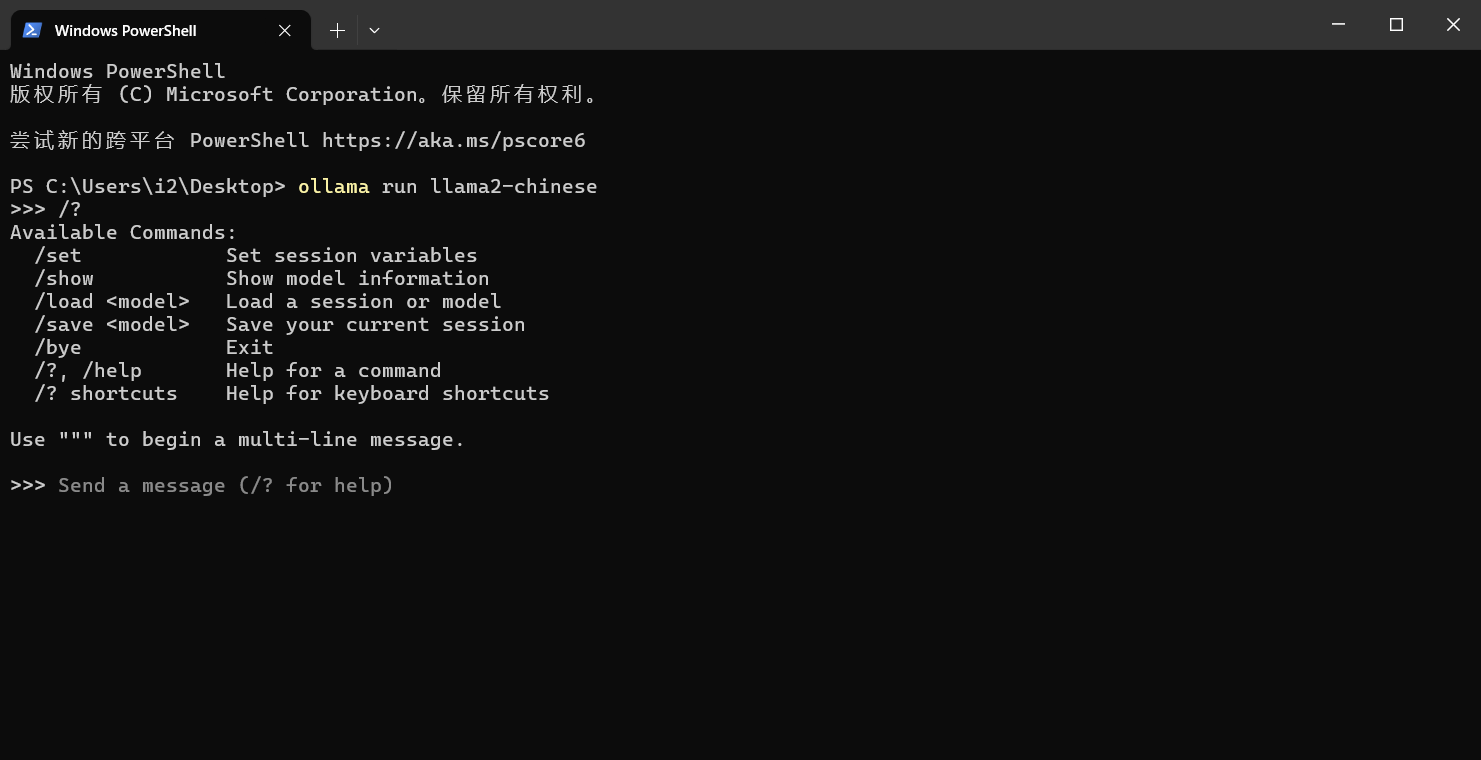
拉取运行
ollama run llama2 -
如果想支持中文拉取这个
ollama pull llama2-chinese -
执行
ollama run llama2-chinese -
ollama默认服务地址端口
http://localhost:11434/
搭建springboot ai项目
说明:对JDK有Version要求,最低JDK17.
maven:3.8.3
JDK:17
2、引入Dependency
<?xml version="1.0" encoding="UTF-8"?>
<project xmlns="http://maven.apache.org/POM/4.0.0" xmlns:xsi="http://www.w3.org/2001/XMLSchema-instance"
         xsi:schemaLocation="http://maven.apache.org/POM/4.0.0 https://maven.apache.org/xsd/maven-4.0.0.xsd">
    <modelVersion>4.0.0</modelVersion>

    <parent>
        <groupId>org.springframework.boot</groupId>
        <artifactId>spring-boot-starter-parent</artifactId>
        <version>3.2.4</version>
        <relativePath/> <!-- lookup parent from repository -->
    </parent>

    <groupId>com.example.ai</groupId>
    <artifactId>ollama-chat</artifactId>
    <version>0.0.1-SNAPSHOT</version>
    <name>ollama-chat</name>
    <description>Ollama Chat project for Spring Boot</description>

    <properties>
        <java.version>17</java.version>
    </properties>

    <dependencies>
        <dependency>
            <groupId>org.springframework.boot</groupId>
            <artifactId>spring-boot-starter-web</artifactId>
        </dependency>

        <dependency>
            <groupId>org.springframework.boot</groupId>
            <artifactId>spring-boot-starter-test</artifactId>
            <scope>test</scope>
        </dependency>

        <dependency>
            <groupId>org.springframework.ai</groupId>
            <artifactId>spring-ai-ollama-spring-boot-starter</artifactId>
        </dependency>
    </dependencies>

    <build>
        <plugins>
            <plugin>
                <groupId>org.springframework.boot</groupId>
                <artifactId>spring-boot-maven-plugin</artifactId>
            </plugin>
        </plugins>
    </build>

    <repositories>
        <repository>
            <id>spring-milestones</id>
            <name>Spring Milestones</name>
            <url>https://repo.spring.io/milestone</url>
            <snapshots>
                <enabled>false</enabled>
            </snapshots>
        </repository>
        <repository>
            <id>spring-snapshots</id>
            <name>Spring Snapshots</name>
            <url>https://repo.spring.io/snapshot</url>
            <releases>
                <enabled>false</enabled>
            </releases>
        </repository>
    </repositories>

    <dependencyManagement>
        <dependencies>
            <dependency>
                <groupId>org.springframework.ai</groupId>
                <artifactId>spring-ai-bom</artifactId>
                <version>1.0.0-SNAPSHOT</version>
                <type>pom</type>
                <scope>import</scope>
            </dependency>
        </dependencies>
    </dependencyManagement>
</project>
编写Controller
package com.example.ai.ollamachat.controller;

import org.springframework.ai.chat.ChatResponse;
import org.springframework.ai.chat.messages.UserMessage;
import org.springframework.ai.chat.prompt.Prompt;
import org.springframework.ai.ollama.OllamaChatClient;
import org.springframework.beans.factory.annotation.Autowired;
import org.springframework.web.bind.annotation.GetMapping;
import org.springframework.web.bind.annotation.RequestParam;
import org.springframework.web.bind.annotation.RestController;
import reactor.core.publisher.Flux;

import java.util.Map;

@RestController
public class ChatController {

    private final OllamaChatClient chatClient;

    @Autowired
    public ChatController(OllamaChatClient chatClient) {
        this.chatClient = chatClient;
    }

    @GetMapping("/ai/generate")
    public Map generate(@RequestParam(value = "message", defaultValue = "Tell me a joke") String message) {
        return Map.of("generation", chatClient.call(message));
    }

    @GetMapping("/ai/generateStream")
    public Flux<ChatResponse> generateStream(@RequestParam(value = "message", defaultValue = "Tell me a joke") String message) {
        Prompt prompt = new Prompt(new UserMessage(message));
        return chatClient.stream(prompt);
    }

}
application.propertiesConfiguration
spring.application.name=ollama-chat
spring.ai.ollama.base-url=http://localhost:11434/
spring.ai.ollama.chat.enabled=true
spring.ai.ollama.chat.options.model=llama2
spring.ai.ollama.chat.options.temperature=0.7
更多ParameterConfiguration见文档 https://docs.spring.io/spring-ai/reference/api/clients/ollama-chat.html
Test
访问http://localhost:8080/ai/generate
Return结果
{"generation":"\nWhy don't scientists trust atoms? Because they make up everything! 😂"}说明
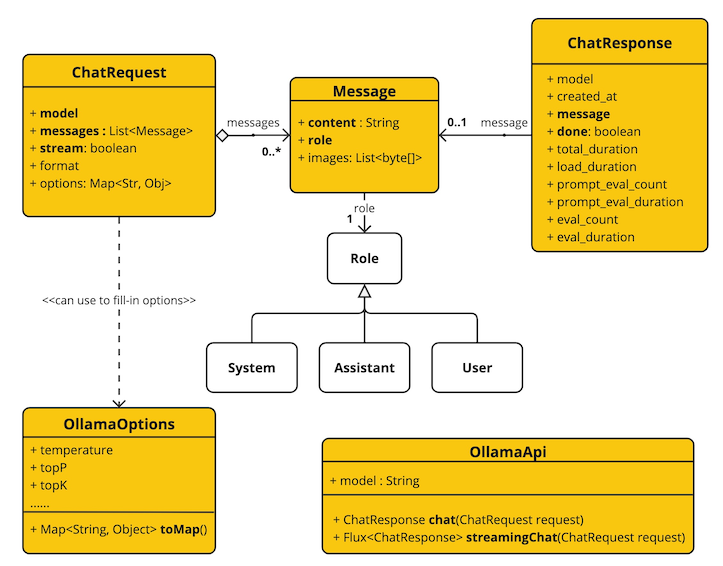
OllamaApi 聊天Interface和Build块图:
更多其它LLM接入,后续更新。